How to Share a Calendar for Group Travel
October 10, 2026·MyPerfectStay

You've found the dates that seem to work, but the group chat still has three versions of the plan. One traveler is checking flights to Paris, another has booked a hotel in Rome, and someone else has ruled out the proposed weekend because of a school break or a work commitment. A shared calendar can bring those dates together, but it can't decide which compromise is fair, what everyone wants to do, or how much personal information each traveler should reveal.
For complex trips across Europe and MENA, the most reliable approach is to share a dedicated travel calendar, then add a separate decision layer for preferences, trade-offs, and confirmations. That combination keeps flights, check-ins, reservations, and deadlines visible without turning everyone's private schedule into group property.
Table of Contents
- Why Cloud Calendars Became the Travel Coordination Standard
- Setting Up Shared Calendars Across Major Platforms
- Protecting Privacy with Context-Sensitive Calendar Sharing
- Turning Availability into Decisions with MyPerfectStay
- Overcoming Participation Fatigue in Group Planning
- Executing a Multi-Generational Trip to Rome
Why Cloud Calendars Became the Travel Coordination Standard
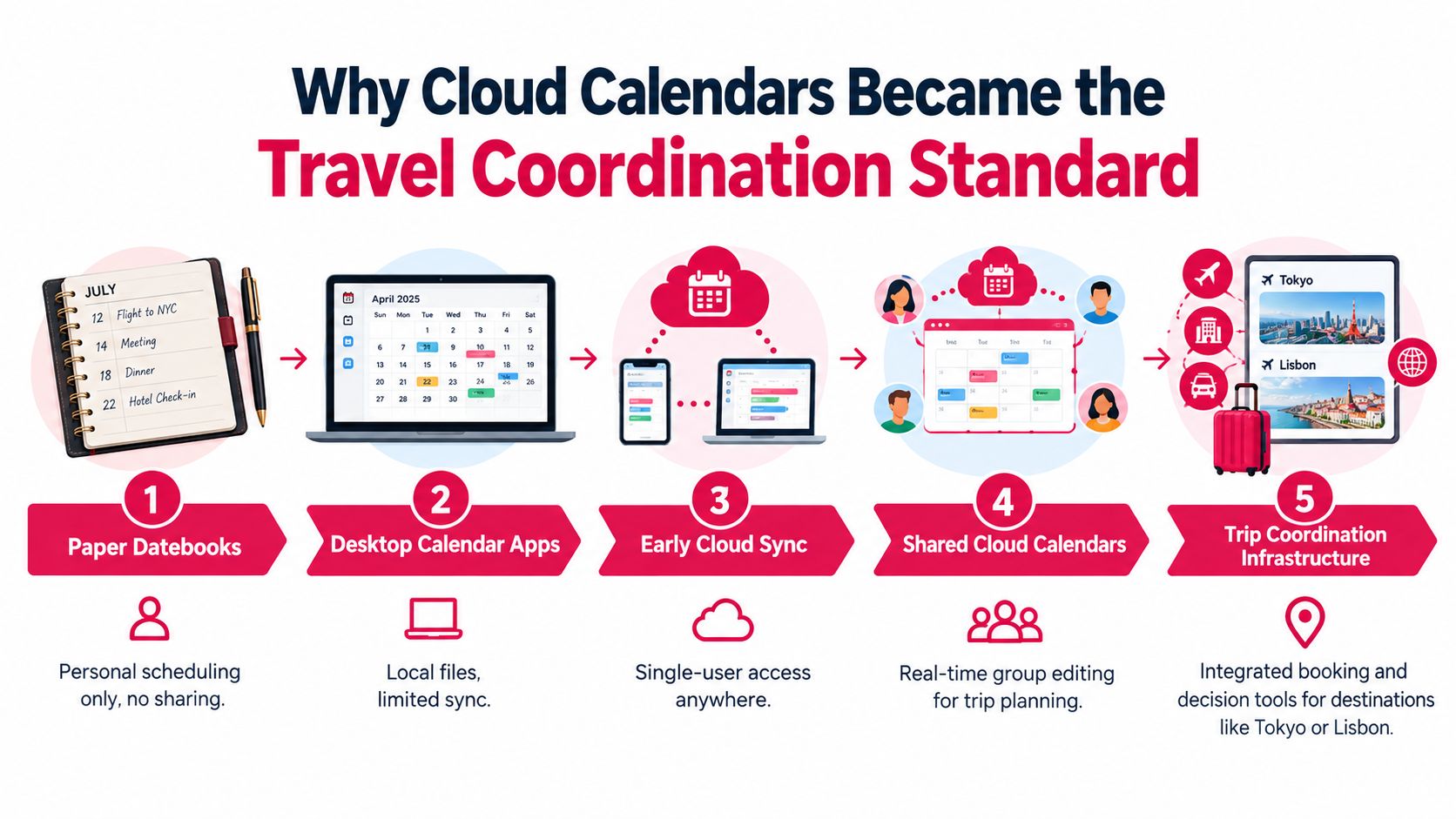
A shared trip usually starts breaking down before anyone travels. One cousin adds flight times to a phone calendar, another keeps hotel confirmations in email, and the organizer is left reconciling changes across time zones. Cloud calendars became the default fix because they keep the same itinerary visible on every device, for every traveler, without waiting for one person to forward the latest version.
The shift happened as scheduling moved from desktop software to cloud services. Google Calendar launched globally on October 17, 2012, and that change matched a broader move toward mobile and web-based scheduling. By 2025, cloud deployments were estimated to account for 78.2% of the calendar-software market, compared with 21.8% for on-premises deployments, according to calendar software market estimates. These are commercial estimates rather than official government figures, but they reflect why travelers now expect plans to stay synced across browsers, phones, and locations.
For trip coordination, that matters. A hotel check-in in Barcelona, a flight connection through Istanbul, a museum booking in Paris, and a desert excursion in Dubai can sit in one shared calendar instead of being scattered across screenshots and chat threads. Everyone sees updates, reminders, and timing changes in the same place.
Why distributed groups need one source of truth
Shared scheduling also fits how people already coordinate work and family commitments. In the United States, 35.5 million people teleworked or worked from home for pay during the first quarter of 2024, an increase of 5.1 million from the same period in 2023, according to the U.S. Bureau of Labor Statistics data cited in online calendar market research. Group travel has the same coordination problem. People are rarely in the same room when dates get chosen, deposits come due, or reservations shift.
In practice, calendars work best as coordination hubs. They often connect with video meetings, email, and other planning systems, which is why they hold up well for logistics. I use them for deadlines, confirmed bookings, transfer times, and anything the whole group needs to reference fast.
What a native calendar does not handle well is judgment. It can show that six people are free on a Saturday, but it cannot resolve whether that date raises costs for one branch of the family, conflicts with school schedules, or exposes more personal availability than someone wants to share. That gap is common in what group travel involves. The practical answer is to keep the shared calendar for logistics, then layer a dedicated travel-planning tool over it for preferences, trade-offs, and decisions, without forcing everyone to open up their full personal schedule.
Setting Up Shared Calendars Across Major Platforms
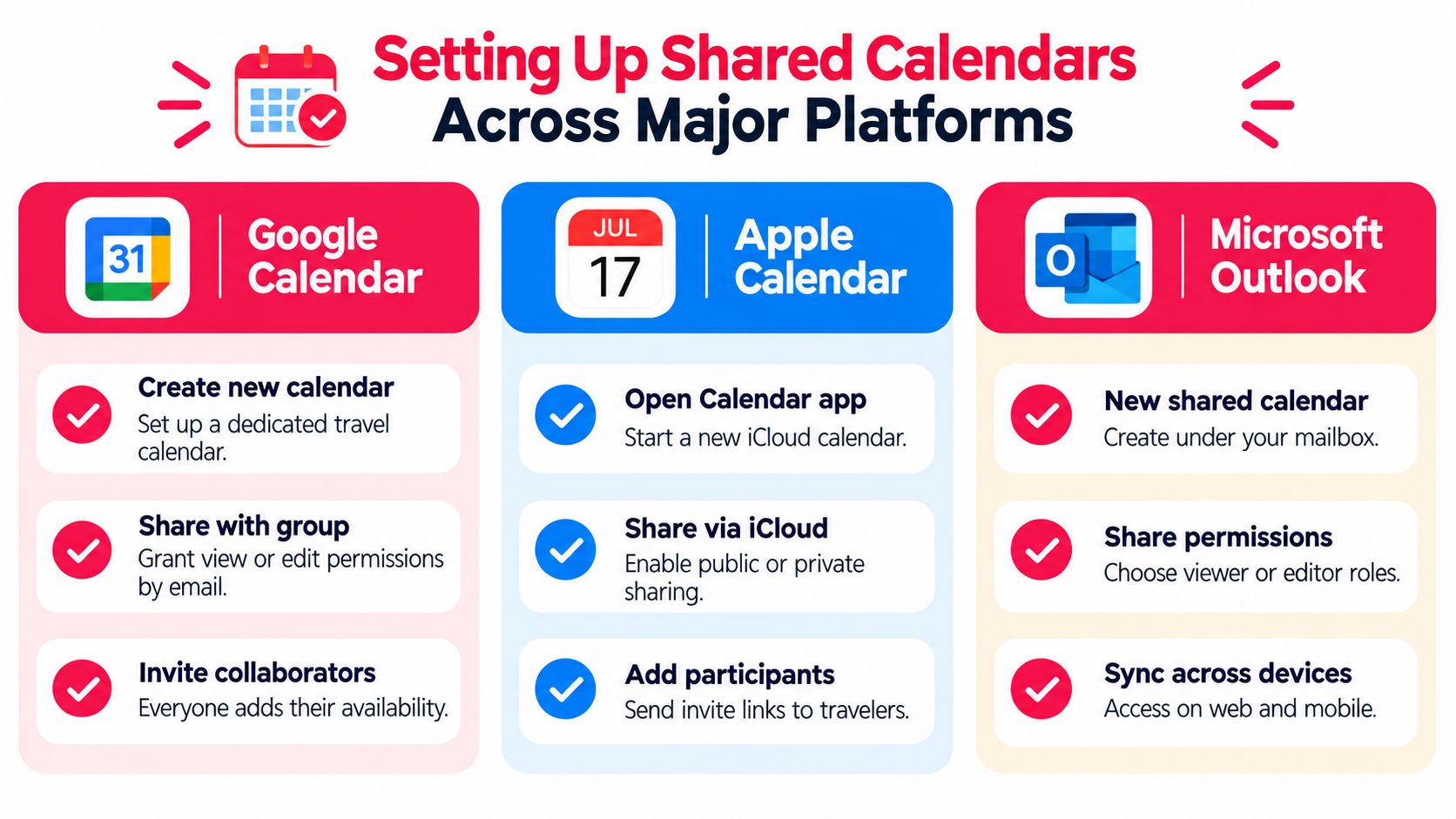
Create a separate calendar for the trip, rather than sharing your personal calendar. Name it clearly, such as “Rome Family Reunion” or “Dubai Offsite,” and decide before inviting anyone who may view events and who may edit them. Editing access should normally go to the organizer and one backup person, while most travelers need viewing access or a way to submit availability separately.
Google Calendar
On the web, open Google Calendar, select Other calendars, choose Create new calendar, and add the trip name and description. Open the calendar's settings, select Share with specific people or groups, enter participants' email addresses, and assign the lowest permission that supports the task.
- View only: Use this for travelers who only need confirmed flights, hotel details, and activities.
- See all event details: Use this when participants need locations, booking references, or notes.
- Make changes to events: Reserve this for the organizer and trusted co-organizer.
- Make changes and manage sharing: Avoid this unless someone genuinely owns calendar administration.
You can also create events for flights, transfers, check-ins, and reservations, then add reminders such as a notification before departure or hotel arrival. For people outside the Google ecosystem, invitations usually work by email, but public calendar links should be treated cautiously because anyone who receives the link may gain access according to its settings.
Apple Calendar
On an iPhone or Mac, open Calendar and create a new calendar under an iCloud account. Use the calendar's sharing controls to invite participants by Apple ID or email, then choose whether they can view or edit. Public sharing can help with broad read-only access, but it isn't appropriate for passport details, private notes, or booking information.
Apple users can subscribe to calendars from other ecosystems, although display and editing behavior may vary. Test the setup with one traveler on a different platform before adding the whole group. A practical calendar app for friends should reduce platform friction rather than assume everyone uses the same device.
Microsoft Outlook
In Outlook on the web, open Calendar, create a new calendar under My calendars, and use Sharing and permissions to add travelers. Choose a permission level such as busy-only visibility, full details, or editing access, then send the invitation. Recipients may need to accept the invitation before the shared calendar appears in their calendar view.
Use categories or colors consistently:
| Color or category | Use it for |
|---|---|
| Travel logistics | Flights, rail journeys, transfers, and check-in windows |
| Group commitments | Pre-booked tours, shared meals, and mandatory meetings |
| Flexible time | Free afternoons, optional activities, and rest periods |
| Deadlines | Polls, payments, document collection, and final confirmations |
Practical rule: Put confirmed information on the shared calendar. Keep proposals, personal constraints, and unresolved preferences somewhere more controlled.
Protecting Privacy with Context-Sensitive Calendar Sharing
You can lose a family trip at the privacy stage before anyone argues about dates. One traveler does not want cousins seeing medical appointments. Another does not want work colleagues mixed into holiday planning. Standard calendar apps rarely handle that well. They tend to push people toward full detail sharing or a vague free/busy view that lacks enough context to make decisions.
Research involving 30 calendar users found that participants shared 88 calendars in total, with an average of 2.93 calendars per person. Twenty of the 30 participants maintained multiple calendars, using separate layers to control what different people could see, as reported in the calendar-sharing study. The same study found sharing was most common with significant others, followed by friends and coworkers, with reported sharing rates of 22 out of 30, 10 out of 30, and 8 out of 30. For trip planning, that supports different permissions for different relationships instead of one shared feed for everyone.
A practical setup uses three layers.
Start with a private preferences layer. Keep blackout dates, budget limits, energy constraints, accessibility needs, and personal commitments there. As the organizer, I often need that context to spot conflicts, but the group does not need the underlying reason.
Then create a group-visible shortlist. Show candidate dates, destination options, rough availability, and activities under consideration. Busy-only visibility works well here. A traveler can block a day without exposing a clinic visit, a work review, or a family obligation.
Finish with a confirmed itinerary layer. Put only decision-ready information on it: flights, hotel details, transfers, reservations, meeting points, and deadlines. That keeps the shared calendar useful instead of noisy.
This is also where a dedicated group-travel tool earns its place beside the calendar. A shared calendar is good at showing constraints. It is weak at handling private preferences, ranking options, and resolving trade-offs without oversharing. Tools like MyPerfectStay can collect availability and preferences privately, then publish only the agreed dates and bookings back to the shared calendar.
Use separate calendars, busy-only visibility, and explicit consent before exporting events. Remove access when someone leaves the trip or when a hotel partner no longer needs arrival details. Privacy makes people more willing to share the information that helps the group decide.
Turning Availability into Decisions with MyPerfectStay
Availability is only the first filter. A calendar can reveal that a group overlaps in Rome, Lisbon, or Marrakech, but it can't rank a museum tour against a food walk, weigh a low-energy day against a packed excursion, or show whether a proposed activity excludes grandparents or teenagers.
European and MENA destinations offer a strong testing ground because group trips often combine different interests in a compact itinerary. In 2024, Mallorca recorded 55.3 million tourist accommodation nights, while Rome, Paris, and Barcelona each exceeded 40 million nights, according to Eurostat tourism data. Those destinations support many possible combinations, from a relaxed city break to a food-focused route with optional cultural activities.
Use the calendar for constraints, not arguments
A workable sequence separates scheduling from preference collection:
- Collect availability privately. Ask each traveler for possible dates, preferred dates, unacceptable dates, budget range, and relevant mobility or energy constraints.
- Publish the viable window. Add only the decision-ready dates to the shared calendar.
- Gather activity preferences. Let participants rank experiences such as museum visits, cooking classes, boat trips, desert excursions, or food tastings.
- Resolve trade-offs. Compare the group's interests and identify strong matches, minority needs, and activities that can run in parallel.
- Confirm the itinerary. Add only agreed plans, with booking status, ownership, meeting points, and cancellation notes.
MyPerfectStay's private survey and smart voting algorithm are designed for this middle layer. Travelers can provide budget, interests, energy level, and must-see ideas without turning every preference into a group-chat debate. The platform surfaces activities with match scores, then supports voting, confirmation, booking, and an auto-organized daily itinerary through its group-travel planning workflow.
The calendar remains the operational record. The decision tool handles the reasoning that calendars lack. That division prevents a common mistake: treating the first date with broad availability as automatically fair.
Overcoming Participation Fatigue in Group Planning
By the third round of messages, group planning usually stalls. One cousin still has not replied, another changes dates after flights are shortlisted, and someone assumes the organizer has checked cancellation terms for everyone. I have seen this happen on family trips to Europe and MENA often enough to treat it as a process problem, not a personality problem.
People respond when the ask is small, the deadline is clear, and the result is visible. Research on groupware found a familiar imbalance between the people who enter information and the people who benefit from coordination. In a small experimental study, adding access notifications or time-limited visibility did not noticeably increase participants' comfort with sharing, as described in this Microsoft Research report on calendar information sharing. More alerts do not solve participation fatigue if the group is still being asked to disclose too much or decide too many things at once.
Shared calendars help with timing. They are weak at privacy and decision-making. That gap matters in travel groups, where a traveler may be willing to mark a weekend as possible but not willing to expose work meetings, medical appointments, school events, or budget limits to the full group. A separate decision layer such as MyPerfectStay works better for collecting those inputs privately, then pushing only agreed outcomes to the calendar.
Stage the decisions
Use distinct deadlines for distinct choices:
- Availability deadline: Ask for free/busy windows, blackout dates, and flexibility.
- Preference deadline: Collect activity interests, budget boundaries, and energy requirements.
- Confirmation deadline: Require a clear response before booking or payment.
- Update deadline: Close routine changes once the itinerary is confirmed, except for emergencies or agreed exceptions.
Keep each request narrow. If a detail will not change the decision, do not ask for it.
Then show participants what their input changed. If a traveler's preference moves an activity onto the shortlist, say so. If a mobility constraint changes the route or meeting point, record the operational adjustment without exposing private context. Automated reminders should go only to non-responders, and one concise nudge with a direct link usually works better than repeated group messages. For labels and permissions, use plain terms such as private, group-visible, and confirmed. Separate research on sharing controls found a lock icon produced fewer errors and higher confidence than a megaphone icon, so words should do the main work, not symbols alone.
Executing a Multi-Generational Trip to Rome
A Rome family reunion shows why a shared calendar needs a decision layer. The group includes grandparents who need manageable walking distances, teenagers who want flexibility, parents coordinating school holidays, and relatives balancing work commitments. Rome is a practical destination for this scenario, and the region was among Europe's leading tourism areas in 2024, with Rome exceeding 40 million tourist accommodation nights in the Eurostat figures cited earlier.
The organizer creates a dedicated Outlook calendar called “Rome Family Reunion.” Each household submits free/busy windows and blackout dates privately. The shared calendar displays only possible travel periods, while personal work meetings, school details, and medical appointments remain hidden.
Turning overlap into a fair plan
The family doesn't choose the first date that works for the majority. The organizer compares possible, preferred, and unacceptable dates, then considers who would absorb the largest burden if a date moved. A date that creates a difficult work change for one household may be less fair than a slightly less convenient option for several others.
Next, the group submits activity preferences privately. Grandparents prioritize shorter walking routes and cultural visits, teenagers select food experiences and free time, and parents identify a budget ceiling and preferred meal schedule. The voting layer can surface strong matches while preserving parallel options, such as a Colosseum visit for one subgroup and a slower neighborhood food tour for another.
The Outlook calendar receives only confirmed events: arrival windows, hotel check-in, accessible transfers, group meals, optional activities, and meeting points. One organizer edits the schedule, while a backup organizer can correct logistics. For transport or local services, a provider's full itinerary of offerings can help the organizer compare options before adding a confirmed booking to the family calendar.
This workflow prevents the grandparents' needs from becoming a public debate and stops the most vocal travelers from defining the entire trip. It also gives teenagers legitimate flexibility without leaving parents uncertain about where everyone is expected to be. The final calendar isn't just a list of events. It is the visible record of decisions made with privacy, fairness, and clear ownership.
MyPerfectStay helps groups collect private preferences, compare activities fairly, and turn agreed dates into a shared, auto-organized itinerary. Visit MyPerfectStay to plan your next Europe or MENA group trip with clearer decisions and fewer chat debates.