Group Scheduling Tool: How It Works and How to Choose One
October 27, 2026·MyPerfectStay
You're in a group chat that started with real excitement and now sits stuck. Someone suggested Barcelona, two people liked different weekends, one person can't afford the hotel everyone else wants, and nobody wants to say so. That's not a lack of interest. It's a missing system for turning private limits and preferences into one plan everyone can accept.
Table of Contents
- What a Group Scheduling Tool Actually Replaces
- Core Features and the Problems Each One Solves
- How Private Votes Become a Group Decision
- Use Cases From Friend Trips to Corporate Offsites
- A Barcelona Weekend Decided in Two Days
- Keeping Accessibility and Fairness in the Decision
- Pick a Tool Against This Checklist
What a Group Scheduling Tool Actually Replaces
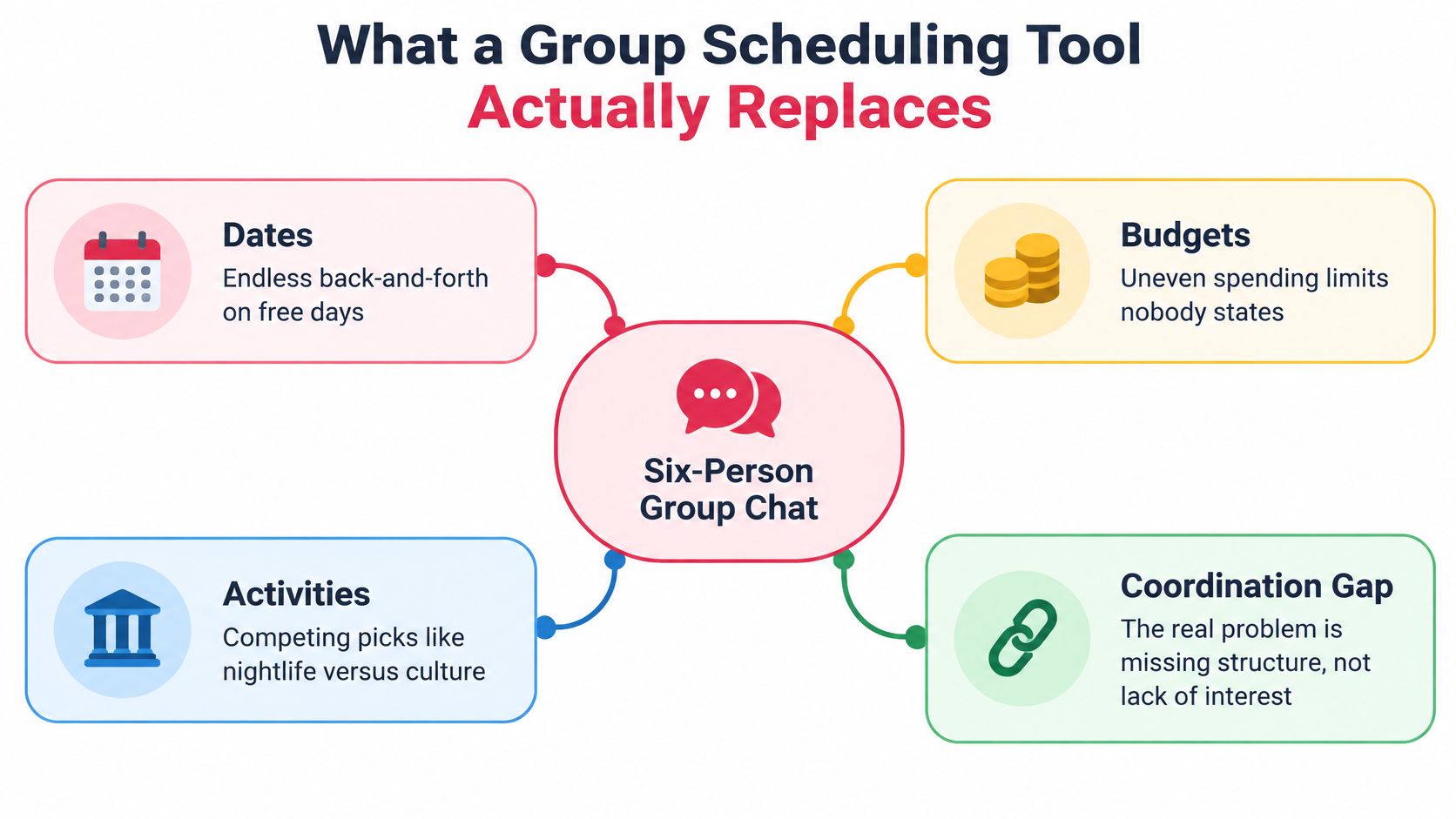
Say six friends are trying to lock a Barcelona weekend. The thread drifts for days over dates, budgets, and whether to visit Park Güell, the Picasso Museum, or neither. Each new message buries the last decision, and the organizer ends up re-asking questions people already answered.
That stall is common. Nearly 50% of Americans felt stressed when planning travel for friends or family, and 57% of Americans were stressed by the combined challenges of choosing accommodations, selecting a destination, and coordinating travel schedules, according to the 2018 survey commissioned by KAYAK. A group scheduling tool replaces that scattered process by collecting each traveler's preferences privately, comparing them, and turning them into a shared shortlist and decision.
Think of it as a restaurant order ticket system. Every table's order reaches the kitchen in the same format before cooking starts, instead of cooks taking shouted requests one at a time. The tool does three jobs in the same spirit. It gathers inputs from everyone, reveals where preferences overlap, and locks the result so the plan reaches everyone at once.
The Contrast in Practice
| Decision point | Manual coordination (chat, polls, spreadsheets) | Group scheduling tool |
|---|---|---|
| Where preferences live | Scattered across chat threads and direct messages | One survey per traveler, collected in one place |
| Who sees budgets | Often disclosed publicly or not at all | Kept private, used only in the calculation |
| How a decision is made | Loudest or fastest voices tend to win | Votes are aggregated and scored across the group |
| How changes reach everyone | Organizer re-posts, some members miss them | Shared itinerary updates for all participants |
| Time to a decision | Often several days of back-and-forth | Typically one voting round after the survey |
If you're weighing whether you need one, count the open threads your last group trip needed to settle dates alone. If you also had separate chats for rooms, activities, and money, you're already doing the tool's job by hand. Pairing it with guidance on how to share a calendar with your whole group removes the second common failure, where people agree in principle but never see the same dates.
Count your open threads, not your messages. The number of places a decision can hide is the real measure of the chaos.
Core Features and the Problems Each One Solves
Not every product includes every feature, so treat this list as a buyer's checklist. Check what each capability removes, not just whether the sales page names it.
-
Private preference survey. Each traveler spends about two minutes entering budget, interests, energy level, and must-see ideas. That removes loud-voice pressure and the awkwardness of stating a spending limit in front of friends. Check that answers stay hidden from other members.
-
Voting with match scores. Each option gets a score showing how well it fits the group, which ends endless debate over who "won." Scores only help if they're explained in plain words. If the tool can't say why an option scored well, don't trust the number.
-
Auto-organized daily itinerary. Chosen activities become a shared plan so details don't get lost after the vote. Changes should update for every participant at once, not live in a document only the organizer edits.
-
Deadlines and reminder nudges. The organizer sees who hasn't answered and sends reminders only to pending members. That matters more than it sounds. Most delays come from two silent people, not from disagreement.
Access and Booking Matter as Much as Voting
-
Link invites with no account needed. Travelers respond from a shared link, removing the sign-up step that stops people joining. I would reject any tool that forces every grandmother and plus-one to create a password before giving input. Low-friction invite flows are worth studying in other group contexts too, and you can explore the pickleball app flow from Pickleballer for a useful comparison of how a link-led sequence keeps participants moving.
-
iOS and Android apps. People plan on trains and in queues, so mobile access helps. Verify that app data matches the web version exactly, or you'll create two competing sources of truth.
-
Booking from the vote. The chosen activity is confirmed for the whole group in one step, with instant confirmations sent to all participants. That closes the gap between choice and reservation, where good plans often die while someone "books it later."
The practical payoff is plain. You get fewer repeated questions, fewer silent disagreements surfacing at the airport, and a shorter path from idea to confirmed plan. A tool missing two or three of these items may still run a poll, but it won't reliably finish the job.
How Private Votes Become a Group Decision
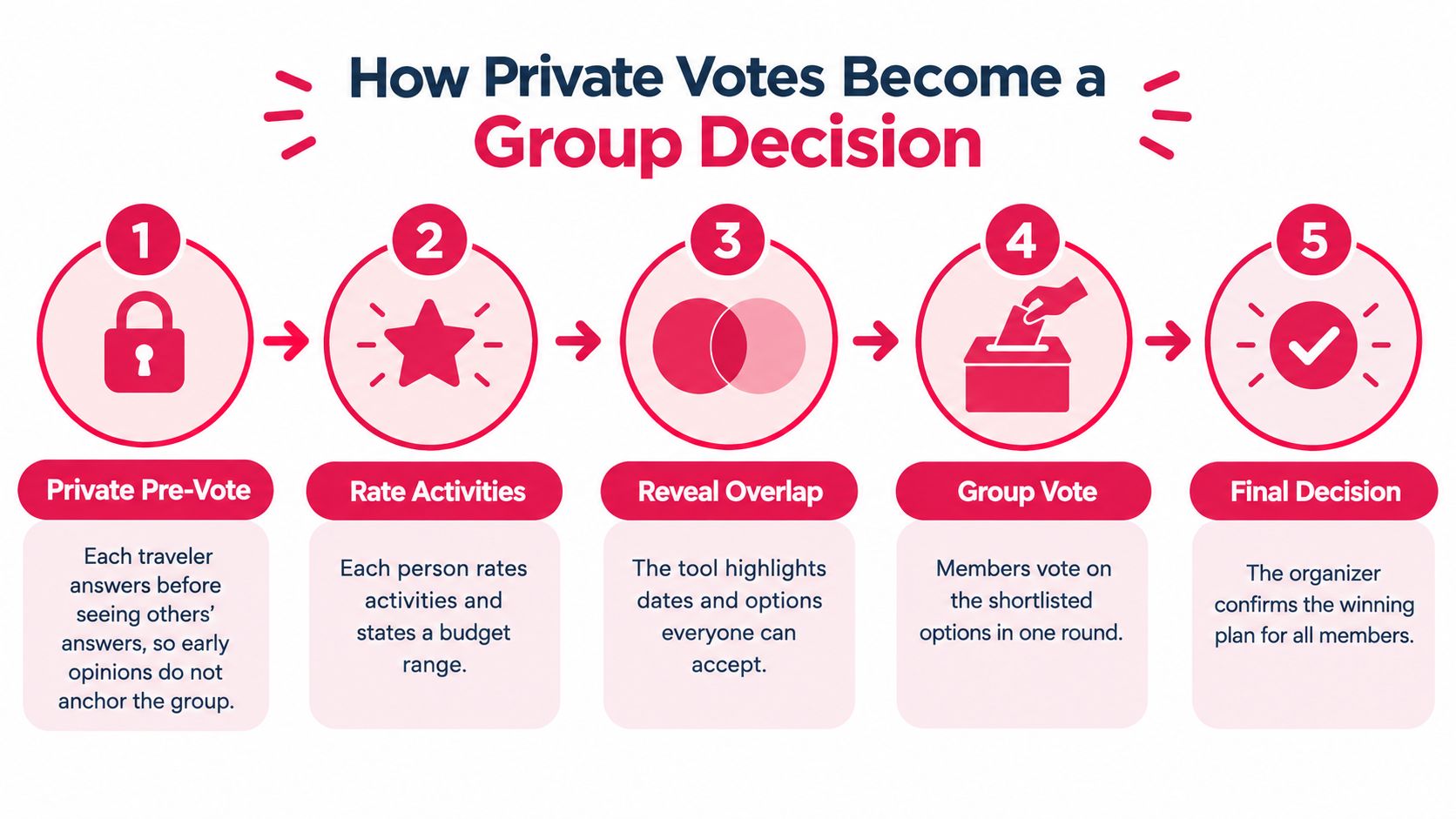
The sequence below shows the flow from private input to a locked plan, before the detailed steps.
Good systems keep preference collection and decision aggregation separate. Research comparing majority voting with confidence-weighted majority voting found that confidence-weighted simulations matched real-group decision accuracy, whereas unweighted majority simulations produced lower accuracy, as reported in the experimental research on group judgment and aggregation. That distinction should shape how you judge any tool.
Five Steps From Input to Decision
-
Private pre-vote first. Each traveler answers before seeing others' answers, so early opinions don't anchor the group and quieter members aren't just reacting to the first speaker.
-
Rate strength, not just yes or no. Each person rates activities and states a confidence or priority level. A simple yes count hides the difference between "I'd love this" and "I suppose so," and it treats both as equal enthusiasm.
-
Apply hard constraints as filters. A budget ceiling or accessibility need determines eligibility. It isn't a vote that five other people can outweigh, and it shouldn't disappear inside an average.
-
Build the match score. A strong score combines normalized preference strength, the share of the group that accepts the option, minimum acceptance thresholds, and a penalty for disagreement. Counting yes votes alone is too crude.
-
Present a plain signal. The organizer should see something operational, such as eight of ten approve and two have budget conflicts. That tells you whether to lock, negotiate, or swap the option.
An average can mislead you. In group decisions, the member closest to the middle often shapes the outcome more than extreme opinions do, so broad central acceptance is usually a better target than a high arithmetic mean dragged up by two enthusiasts. Watch for dispersion as well as the headline score.
The short video below walks through the voting flow visually, which helps when you're explaining the process to a skeptical organizer.
| Signal pattern | What it means | Organizer action |
|---|---|---|
| High coverage, low disagreement | Strong consensus option | Lock it and confirm for everyone |
| High coverage, high disagreement | Workable compromise with dissent | Ask the dissenting members what would change their vote |
| Strong score, one hard constraint failed | Popular option that is not feasible for someone | Offer an alternative or a shared-cost variant |
| Low coverage with pending members | Decision not yet ready | Send a targeted nudge before the deadline |
Practical rule: A popular option that's infeasible for one person isn't a group decision yet. Your tool should say so clearly instead of hiding it behind a score.
Use Cases From Friend Trips to Corporate Offsites
A friend group can agree on taking a Lisbon city break and still get stuck on the details. Budgets vary, some want nightlife while others prefer museums, and late replies can stall the plan. Private budget ranges and a clear deadline turn those differences into useful constraints instead of another open-ended chat poll.

A family reunion brings different needs. In Rome, toddlers, teenagers, and grandparents may have different energy levels and mobility requirements. Activity-intensity filters and explicit opt-outs help the organizer build a plan people can join without asking anyone to explain privately why a long walking tour will not work.
Corporate teams face calendar limits and approval chains, so coordination time adds up across meetings and decisions. For a Dubai offsite, a shared itinerary and clear confirmations can keep date checks and approvals organized. Pair the scheduling process with a corporate event planning checklist for offsites, and settle ground transport early. For small groups, small group transfers with EC Minibus are one option to consider when luggage and timing affect the plan.
| Group type | Main friction | Setting to prioritize | Example destination |
|---|---|---|---|
| Friends on a city break or bachelorette trip | Uneven budgets and late replies | Private budget ranges and deadlines | Lisbon |
| Family or multigenerational reunion | Different energy levels and mobility needs | Activity intensity filters and opt-outs | Rome |
| Corporate offsite or startup retreat | Calendar limits and approval chains | Shared itinerary and confirmations for everyone | Dubai |
| Hotel guests considering extra experiences | Guests may overlook add-on activities | Show options within the planning flow | Marrakech |
| Travel creator with an audience | Followers want input without a long group chat | Shareable links and clear confirmations | Paris |
For hotels in Marrakech, presenting experiences within the planning flow gives guests a direct way to consider add-ons instead of relying on a leaflet at check-in. A creator organizing a Paris trip has a different priority: a shareable link lets followers vote without joining a busy chat. Match the tool's settings to the group's main friction, whether that is privacy, approvals, accessibility, or keeping decisions visible to everyone.
A Barcelona Weekend Decided in Two Days
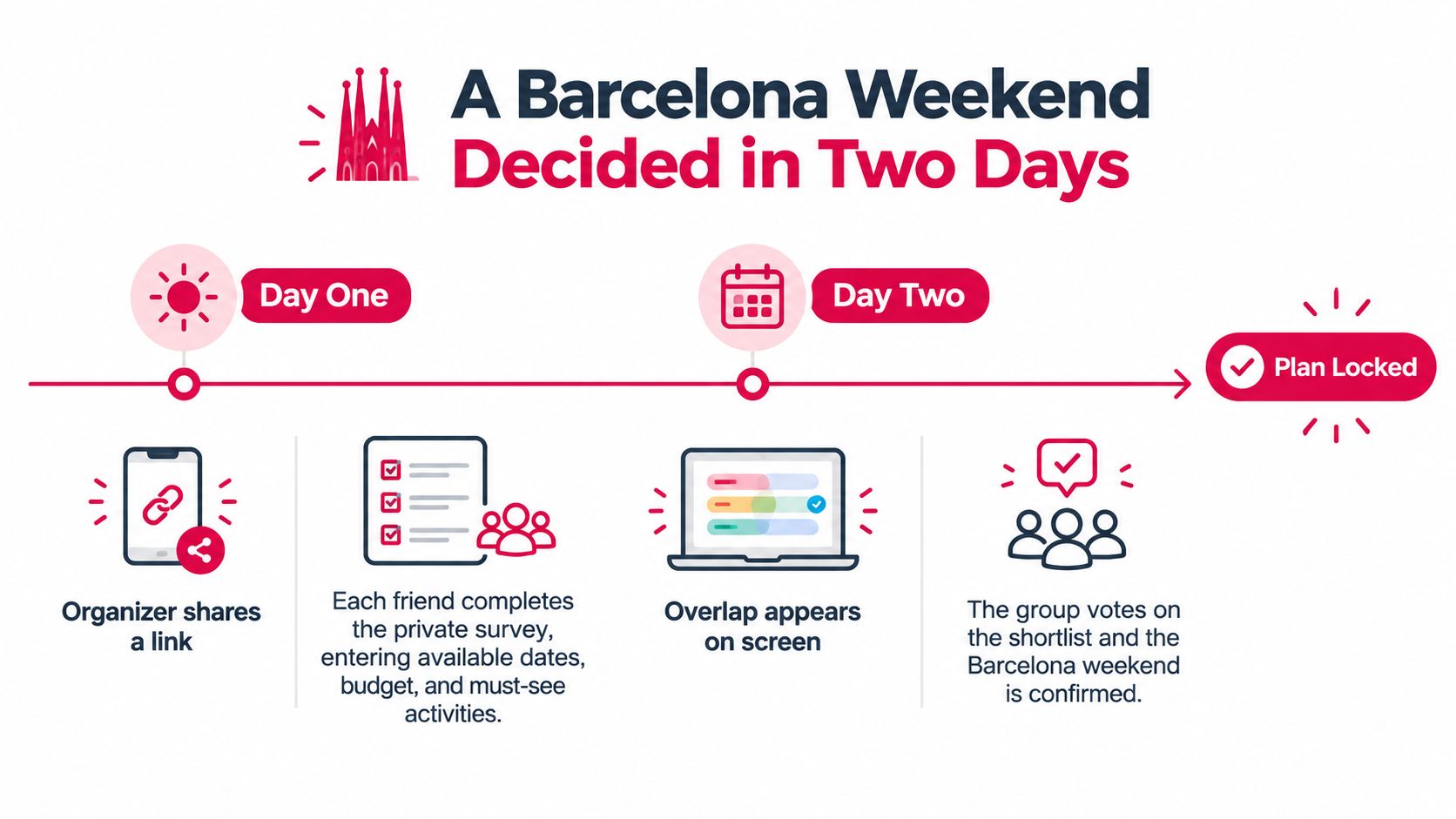
Six friends want a Barcelona weekend, but a week of chat has not settled the dates, spending limits, or Saturday plans. The trip is agreed; the decisions are not. A shared scheduling link turns scattered preferences into a shortlist the group can act on.
Day One
The organizer shares one link, and each friend completes a private survey. They enter a comfortable budget range, choose interests such as architecture, food, beaches, and nightlife, and indicate their preferred energy level. Private answers make it easier to state a spending limit without putting anyone on the spot.
The results show which options work for the group. A Gothic Quarter walk, tapas tasting, and Montjuïc visit all receive broad support. Four friends like a sailing cruise, but it exceeds the budget range of two, so enthusiasm alone does not make it the default.
Day Two
The group reviews the match scores together. The tapas tasting has the widest approval, so they vote on it first and use it to anchor the weekend. The cruise remains an optional extra for the four who want it. That preserves the group choice without making the two tighter-budget travelers explain themselves or pay to join.
Barcelona is a high-demand city, where popular dates and well-located rooms can fill early. For context, the Eurostat tourism accommodation figures for 2024 report 3.02 billion nights spent in EU tourist accommodation during 2024. That is an EU-wide total, not a Barcelona figure. Agreeing on dates early gives the group a firm basis for arranging the rest of the trip.
What Changed
- Day one morning: The organizer shares the link; everyone submits preferences privately.
- Day one evening: The group sees common interests, and the cruise's budget conflict is flagged without identifying anyone.
- Day two: Members vote on the shortlist, then confirm the tapas tasting for all six.
- After confirmation: Each participant receives the same itinerary.
The group did not need to agree on every activity. A simultaneous survey replaced repeated persuasion with comparable input, while the results showed where budgets differed without naming who set a limit. The optional cruise gave interested friends another choice without making it a condition of the shared plan.
Keeping Accessibility and Fairness in the Decision
Majority vote sounds fair until you ask who absorbs the cost of losing. A traveler who needs step-free access, a parent managing a child's bedtime, and a friend on a tight budget don't experience the winning option equally, even if each had one vote.
Accessibility isn't a niche edge case. In European research surveying 3,473 travelers with mobility and accessibility needs across France, Germany, Italy, Spain, and the UK, 52% had taken an international multiday organized group tour or package holiday in the previous two years and 61% said they were likely to do so within the next two years, according to the portrait of European travellers with mobility and access needs. Tools that ignore those needs aren't neutral. They're incomplete.
Constraints Without Disclosure
Treat accessibility as structured data. A traveler can flag step-free access, transport limits, seating needs, walking intensity, and restroom availability without sharing medical details with the group. The system uses the flag, and the reason stays private.
Say a Rome rooftop bar is reached only by stairs. For a traveler who needs step-free access, the tool removes it and surfaces an alternative terrace with lift access, with a short note explaining the swap in practical terms. Nobody has to disclose a diagnosis to defend the change, and the group doesn't discover the problem at the door.
Fairness needs the same discipline. Good practice includes private budget ranges, constraints that filter options rather than weighted personalities, explicit opt-outs, deadlines with reminder escalation, and explanations showing why an option matched. Comparing those choices against established group decision-making methods for fair outcomes helps organizers pick a rule before a specific dispute makes every rule look self-serving.
One choice for everyone isn't always fair. Transparent trade-offs, optional alternatives, and stated confidence levels often serve a group better than a single winner handed down by the majority.
That approach also protects relationships. People accept losing a vote when they can see their hard limit was respected and the winning option genuinely fit most of the group. They resent outcomes they can't inspect.
Pick a Tool Against This Checklist
Start with a simple decision rule. Score each candidate against the criteria below before you compare prices or design, because a polished interface that averages away someone's budget ceiling will still produce an unfair result.
Weight the checklist by group type first. Friend groups should prioritize private budget ranges and deadlines, families should prioritize accessibility filters and opt-outs, and corporate teams should prioritize confirmations that reach every participant. Then score candidates without bias.
| Criterion | What to verify | Red flag |
|---|---|---|
| Private preferences | Budgets and interests are hidden from other members | Budgets visible in a shared sheet |
| Score transparency | Match scores can be explained in plain words | Single score with no reasoning |
| Hard constraints | Budget ceilings and accessibility act as filters | Constraints averaged away in a vote |
| Participation tracking | Organizer sees who is pending and can nudge them | No view of non-responders |
| Itinerary and booking | Chosen activities become a shared daily plan and can be booked | Plan stays in a separate document |
| Access | Traveler can start from a link without an account | Sign-up required before any input |
| Confirmations and changes | Updates reach every participant | Changes posted only in the organizer's chat |
Run a Live Test Before You Commit
Create a link, invite a small group, run the survey, and time how long it takes to reach a decision you'd really book. Include one person with a tight budget and one who typically replies late, because a test with only eager planners proves nothing. I would pay closest attention to the explanation behind each score and to what happens when a hard constraint fails.
One option that fits this checklist is MyPerfectStay, which uses a two-minute private survey per traveler, a voting algorithm that shows match scores, an auto-organized daily itinerary, and organizer deadlines and nudges. It requires no account or app download to start, offers iOS and Android apps, and lists 300,000+ bookable experiences across 190+ countries, so a group can book what it votes for in the same flow.
Choose the tool that passes the most red-flag tests for your specific group. Don't choose the one with the longest feature list if it publishes budgets, hides its scoring, or leaves non-responders invisible.
Ready to replace the stalled chat with a decision your whole group can see explained? MyPerfectStay lets each traveler answer privately in about two minutes, surfaces match scores, and turns the winning choices into a shared, bookable itinerary. Start your next Lisbon, Barcelona, or Marrakech trip there and lock the plan while everyone's still excited about it.